Installation Help
What to do if you receive a Windows SmartScreen alert?
As an industrial software publisher, T-IA Connect uses direct distribution. Windows Defender SmartScreen may display a temporary warning on the first launch. Here is how to proceed safely.
Scenario 1: Blue window 'Windows protected your PC'
Ensure that the application was downloaded from the official t-ia-connect.com domain.
Click on the "More info" link.
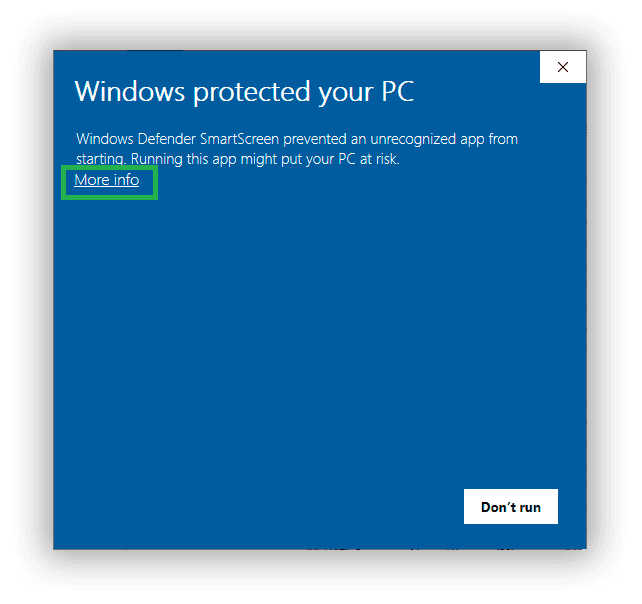
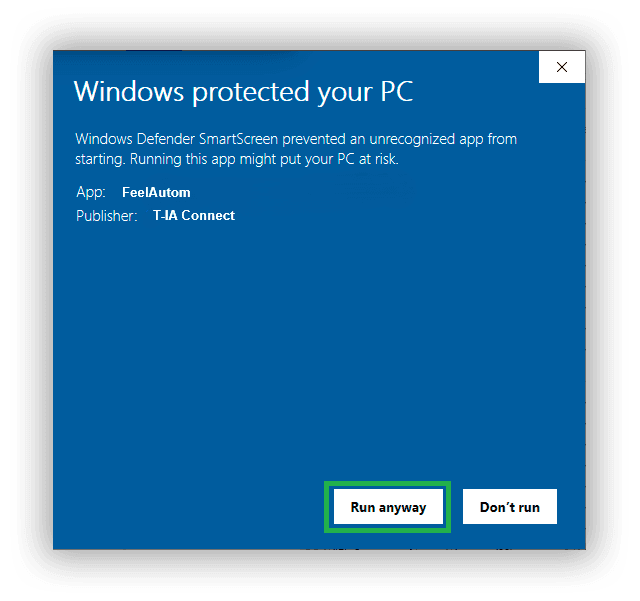
Verify the publisher, then click on the "Run anyway" button.
Why am I receiving this message?
Microsoft Windows Defender uses a reputation-based system. When a new version of specialized software (like an automation tool) is published, it hasn't been downloaded by millions of users yet.
As soon as Microsoft sees that engineers are running the application and trust it, this alert will automatically disappear. This is standard behavior for software distributed outside the Microsoft Store.
Security Guarantee
Each version of T-IA Connect is compiled on our secure servers and undergoes a full antivirus scan before being posted online.